Download the notebook here!
Interactive online version: 
Automated Evidence Review
In Lecture 1 we developed the diagnostic framework for evaluating causal evidence. In Lecture 2 we examined the design patterns that power the evaluation tool. This lecture puts both together. We use the impact-engine-evaluate package end-to-end, running the full MEASURE → EVALUATE pipeline to demonstrate how evidence quality translates into investment decisions.
In Part I we trace the data flow across the pipeline stages and the two evaluation strategies. In Part II we run the pipeline on mock measurement artifacts, inspect the design patterns in the source code, and run the agentic review against a local Ollama backend to validate the evaluator itself.
Part I: The decision pipeline
The decision pipeline connects measurement to action through three stages. MEASURE produces causal estimates. EVALUATE assesses their trustworthiness. ALLOCATE uses confidence-weighted estimates to decide where to invest resources. This lecture focuses on the interface between the first two — how artifacts flow from measurement to evaluation and how the choice of strategy shapes the confidence assessment.
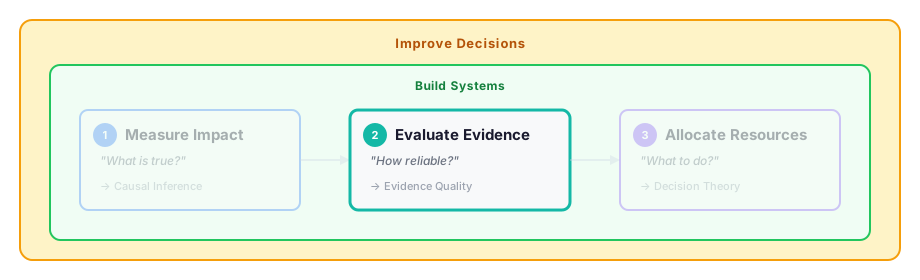
The EVALUATE stage implements two strategies that correspond to different levels of evidence scrutiny:
Strategy |
Basis |
When to Use |
|---|---|---|
|
Methodology-based prior (hierarchy of evidence from Lecture 1) |
Early screening, large portfolios, time-constrained decisions |
|
LLM diagnostic review (applying the framework from Lecture 1 to actual artifacts) |
High-stakes decisions, detailed audit trail, before major resource commitments |
Both strategies return an EvaluateResult containing a confidence score, making them interchangeable from the perspective of the downstream ALLOCATE stage.
Part II: Application
[ ]:
# Standard Library
import inspect
import json

# Third-party
import yaml
from impact_engine_evaluate import evaluate_confidence, list_knowledge_bases, list_prompts, score_confidence
from impact_engine_evaluate.review import (
    MethodReviewerRegistry,
    load_knowledge,
    load_prompt_spec,
)
from impact_engine_evaluate.review.methods.quasi_experimental import QuasiExperimentalReviewer
from impact_engine_evaluate.review.models import DimensionResponse, ReviewResponse
from IPython.display import Code

# Local
from support import (
    create_mock_job_directory,
    plot_confidence_ranges,
    plot_review_dimensions,
    plot_severity_calibration,
    print_evaluate_result,
    print_review_result,
)
1. Measurement artifacts
The EVALUATE stage reads a job directory produced by MEASURE. The directory contains two files:
manifest.jsondescribes the initiative, causal method, and evaluation strategyimpact_results.jsoncontains the measurement output — effect estimate, confidence interval, sample size, cost
In a production setting, MEASURE generates this directory automatically. Here we simulate the handoff — our helper function creates a mock job directory with the same structure, so the lecture runs standalone without requiring the full measurement pipeline. This is intentional: isolating EVALUATE lets us focus on how evidence is assessed without the complexity of producing it.
[ ]:
Code(inspect.getsource(create_mock_job_directory), language="python")
[ ]:
# Create mock MEASURE output
job_dir = create_mock_job_directory()
[ ]:
# Inspect the manifest
manifest = json.loads((job_dir / "manifest.json").read_text())
print("manifest.json:")
print(json.dumps(manifest, indent=2))
[ ]:
# Inspect the impact results
impact_results = json.loads((job_dir / "impact_results.json").read_text())
print("impact_results.json:")
print(json.dumps(impact_results, indent=2))
2. Deterministic scoring
The simplest evaluation strategy assigns a confidence score based on the methodology used, without examining the specific results. This reflects the hierarchy of evidence from Lecture 1. An experiment, by design, provides stronger evidence than an observational study.
Registered methods and confidence ranges
Each registered method reviewer defines a confidence range reflecting the methodology’s inherent strength:
[ ]:
confidence_map = MethodReviewerRegistry.confidence_map()

for method, (lo, hi) in confidence_map.items():
    print(f"  {method}: [{lo:.2f}, {hi:.2f}]")
[ ]:
plot_confidence_ranges(confidence_map)
The confidence range for experiments (0.85–1.00) is higher than it would be for observational methods, reflecting the stronger identification strategy. Within each range, the exact score is drawn deterministically from the initiative ID, ensuring reproducibility across runs.
Running the EVALUATE stage
We run the full EVALUATE pipeline by passing the job directory to evaluate_confidence(). It reads the manifest, dispatches to the appropriate reviewer, and returns an EvaluateResult with the confidence score and strategy report:
[ ]:
result = evaluate_confidence(None, str(job_dir))

print_evaluate_result(result)
score_confidence can also be called directly with an initiative ID and a confidence range — useful when you want to score a single initiative without reading a full job directory:
[ ]:
score_result = score_confidence("initiative_product_content_experiment", (0.85, 1.0))
print(f"Confidence: {score_result.confidence:.3f}")
print(f"Range:      ({score_result.confidence_range[0]:.2f}, {score_result.confidence_range[1]:.2f})")
3. From theory to code
Lecture 2 introduced the architecture of the evaluation system as a set of design patterns — registry-based dispatch, layered specialization, prompt engineering as software, and structured output. Before running the pipeline, we map those patterns to the concrete objects that appear throughout the rest of the notebook.
L02 Pattern |
Code Object |
Role |
|---|---|---|
Registry + Dispatch |
|
Maps method names to specialized reviewer classes |
Layered Specialization |
|
Same interface, method-specific prompts and knowledge |
Prompt Engineering |
|
Versioned YAML templates rendered with Jinja2 |
Structured Output |
|
Pydantic models that constrain LLM output |
Registry and dispatch
The MethodReviewerRegistry maps method names to specialized reviewer classes. Each reviewer defines its own prompt template, knowledge base, and confidence range. The registry enables dispatch — the system reads model_type from the manifest and instantiates the correct reviewer automatically.
[ ]:
print("Registered reviewers:", MethodReviewerRegistry.available())

experiment_reviewer = MethodReviewerRegistry.create("experiment")
Code(inspect.getsource(type(experiment_reviewer)), language="python")
Layered specialization
The QuasiExperimentalReviewer shares the same base class but defines a different prompt, knowledge base, and confidence range. This is the layered specialization pattern from Lecture 2 — same interface, different diagnostic focus. Compare the experiment and
quasi-experimental directories to see how the same interface serves method-specific prompt templates and knowledge bases:
[ ]:
Code(inspect.getsource(QuasiExperimentalReviewer), language="python")
The review pipeline
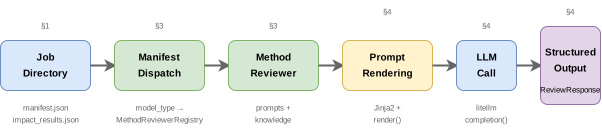
The following diagram traces a single review call from job directory to confidence score. Each box corresponds to a code object introduced in the table above — §4 fills in the remaining steps (prompt rendering, LLM call, structured output) when we run the pipeline end-to-end.
LLM backends via litellm
The pipeline delegates LLM calls to litellm, a lightweight router that provides a unified completion() interface across providers. For this lecture we use Ollama to run models locally — no API keys, no network calls, full control over the backend. A bare litellm call looks like this:
[ ]:
import litellm

response = litellm.completion(
    model="ollama_chat/llama3.2",
    messages=[{"role": "user", "content": "What is 2+2?"}],
    temperature=0.0,
)
print(response.choices[0].message.content)
The evaluation pipeline wraps this call with prompt rendering, structured output parsing, and error handling — but the core mechanism is always a litellm.completion() call to the configured BACKEND. See the engine source for the implementation.
4. Agentic review
We now run the full agentic review pipeline end-to-end using a local Ollama backend. Before triggering the pipeline, we inspect each component it touches — prompt specs, knowledge bases, and response schemas — so the call that follows is fully transparent.
Configuration
The review backend is configured via "review_config.yaml". The BACKEND section specifies the model, temperature, and token limit:
[ ]:
! cat review_config.yaml
[ ]:
# Load config for all review calls in §4 and §5
with open("review_config.yaml") as f:
    review_config = yaml.safe_load(f)

# Create a single review job directory reused across §4
review_job_dir = create_mock_job_directory(evaluate_strategy="review")
Prompt engineering as software
The prompt system treats prompts as versioned software artifacts. Each prompt template is a YAML file with named dimensions, Jinja2 templates, and a version string. Knowledge bases provide domain context that gets injected into the system message.
[ ]:
print("Registered prompts:", list_prompts())
print("Registered knowledge bases:", list_knowledge_bases())
[ ]:
# Load the experiment review prompt spec
spec = load_prompt_spec(experiment_reviewer.prompt_template_dir() / "experiment_review.yaml")

print(f"Prompt:      {spec.name} v{spec.version}")
print(f"Description: {spec.description}")
print(f"Dimensions:  {spec.dimensions}")
print(f"\n--- System template (first 500 chars) ---")
print(spec.system_template[:500])
[ ]:
# Load and display knowledge content
knowledge_content = load_knowledge(experiment_reviewer.knowledge_content_dir())
print(f"Knowledge base length: {len(knowledge_content)} chars")
print(f"\n--- Knowledge content (first 500 chars) ---")
print(knowledge_content[:500])
Structured output
The LLM response is parsed into Pydantic models that enforce the expected schema. ReviewResponse contains per-dimension scores and an overall score — the model’s free-form text is constrained to a validated data structure:
[ ]:
Code(inspect.getsource(DimensionResponse), language="python")
[ ]:
Code(inspect.getsource(ReviewResponse), language="python")
Running the review
We call evaluate_confidence() with the review config and the review job directory. This triggers the full pipeline from the flowchart above: manifest dispatch → prompt rendering → LLM call → structured output parsing.
[ ]:
review_eval_result = evaluate_confidence(review_config, str(review_job_dir))

print_evaluate_result(review_eval_result)
[ ]:
# Extract the ReviewResult from the EvaluateResult
review_result = review_eval_result.report

print_review_result(review_result)
[ ]:
plot_review_dimensions(review_result)
Score vs. review comparison
The deterministic score and the agentic review both produce confidence values for the same artifact. The score reflects the methodology’s inherent strength; the review reflects the LLM’s assessment of the specific evidence:
[ ]:
# Both job directories contain identical artifacts; only the strategy differs
print(f"Deterministic score:  {result.confidence:.3f}  (strategy: {result.strategy})")
print(f"Agentic review:       {review_eval_result.confidence:.3f}  (strategy: {review_eval_result.strategy})")
5. The evaluation harness
Lecture 2, §4 developed the evaluation harness with two modes: Assess mode measures the system’s current performance (read-only), and Improve mode acts on what Assess revealed (modify and re-validate). This section runs the Assess mode against our Ollama backend, executing three of the tests defined in Lecture 2, §4: run-to-run stability, backend sensitivity, and severity calibration. The remaining tests — prompt sensitivity and score distribution — are omitted here but follow the same pattern.
The four pillars define what a trustworthy evaluation system must guarantee. Groundedness, traceability, and reproducibility are enforced by architecture — the LLM only sees measurement artifacts, the output schema links every score to a named dimension, and fixed prompts with zero temperature ensure deterministic execution. Correctness is the exception. Whether the LLM accurately reads the evidence is an empirical property that the tests below verify.
Run-to-run stability
At temperature=0.0 the model uses greedy decoding, selecting the single most probable token at each step. Two calls with identical inputs should produce identical outputs. We verify this by running a second review with identical artifact data:
[ ]:
# Second run with identical inputs (temp=0.0) — reuse the same review job directory
stability_result = evaluate_confidence(review_config, str(review_job_dir))
stability_review = stability_result.report

print("Run-to-run stability (temperature=0.0)")
print("=" * 50)
print(f"  Run 1 overall: {review_result.overall_score:.3f}")
print(f"  Run 2 overall: {stability_review.overall_score:.3f}")
print(f"  Difference:    {abs(review_result.overall_score - stability_review.overall_score):.3f}")
print()
for d1, d2 in zip(review_result.dimensions, stability_review.dimensions):
    diff = abs(d1.score - d2.score)
    label = d1.name.replace("_", " ").title()
    print(f"  {label}: {d1.score:.2f} → {d2.score:.2f}  (Δ = {diff:.2f})")
Re-running with temperature=0.7 demonstrates the effect of stochastic sampling. At non-zero temperature the model samples from its probability distribution, introducing variance across runs:
[ ]:
# Run with temperature=0.7 on the same job directory
stochastic_config = {**review_config, "backend": {**review_config["backend"], "temperature": 0.7}}
stochastic_result = evaluate_confidence(stochastic_config, str(review_job_dir))
stochastic_review = stochastic_result.report

print("Stochastic variance (temperature=0.7)")
print("=" * 50)
print(f"  temp=0.0 overall: {review_result.overall_score:.3f}")
print(f"  temp=0.7 overall: {stochastic_review.overall_score:.3f}")
print(f"  Difference:       {abs(review_result.overall_score - stochastic_review.overall_score):.3f}")
print()
for d1, d2 in zip(review_result.dimensions, stochastic_review.dimensions):
    diff = abs(d1.score - d2.score)
    label = d1.name.replace("_", " ").title()
    print(f"  {label}: {d1.score:.2f} → {d2.score:.2f}  (Δ = {diff:.2f})")
Backend sensitivity
A well-specified rubric should produce similar scores regardless of which backend processes the artifact. We test this by running the same artifact through ollama_chat/mistral and comparing against the llama3.2 baseline.
Note on the Jury architecture. If instead of comparing scores across backends we aggregated them (e.g., by averaging), we would have a Jury architecture as described in Lecture 2, §3 — multiple independent evaluators whose consensus reduces individual model bias:
[ ]:
# Run with mistral backend on the same job directory
mistral_config = {**review_config, "backend": {**review_config["backend"], "model": "ollama_chat/mistral"}}
mistral_result = evaluate_confidence(mistral_config, str(review_job_dir))
mistral_review = mistral_result.report

print("Backend sensitivity (llama3.2 vs. mistral)")
print("=" * 50)
print(f"  llama3.2 overall: {review_result.overall_score:.3f}")
print(f"  mistral overall:  {mistral_review.overall_score:.3f}")
print(f"  Difference:       {abs(review_result.overall_score - mistral_review.overall_score):.3f}")
print()
for d1, d2 in zip(review_result.dimensions, mistral_review.dimensions):
    diff = abs(d1.score - d2.score)
    label = d1.name.replace("_", " ").title()
    print(f"  {label}: {d1.score:.2f} → {d2.score:.2f}  (Δ = {diff:.2f})")
Severity calibration
External validity tests correctness against synthetic artifacts where the right answer is known by construction. We create three artifacts with progressively degrading quality, each defined in its own configuration file:
Artifact |
Sample Size |
Effect |
CI |
Max SMD |
Attrition |
Compliance |
|---|---|---|---|---|---|---|
Known-clean |
10,000 |
50 |
[30, 70] |
0.02 |
0.02 |
0.97 |
Known-medium |
200 |
180 |
[40, 320] |
0.12 |
0.12 |
0.82 |
Known-flaw |
80 |
300 |
[-5, 605] |
0.35 |
0.25 |
0.68 |
If the reviewer is correctly calibrated, the scores should be monotonically decreasing: clean > medium > flaw. This test subsumes the known-clean scoring and known-flaw detection tests from Lecture 2, §4 — all three severity levels are evaluated in a single pass.
[ ]:
# Load severity specs from config files
SEVERITY_CONFIGS = [
    "config_severity_clean.yaml",
    "config_severity_medium.yaml",
    "config_severity_flaw.yaml",
]

severity_reviews = []
for config_path in SEVERITY_CONFIGS:
    with open(config_path) as f:
        spec = yaml.safe_load(f)

    sev_job_dir = create_mock_job_directory(config=spec)
    sev_result = evaluate_confidence(review_config, str(sev_job_dir))
    severity_reviews.append(sev_result.report)
    print(f"\n{'=' * 60}")
    print(f"  {spec['label']}")
    print_review_result(sev_result.report)
[ ]:
severity_labels = ["Known-clean", "Known-medium", "Known-flaw"]

print("Severity calibration summary")
print("=" * 50)
for label, review in zip(severity_labels, severity_reviews):
    print(f"  {label + ':':16s} {review.overall_score:.3f}")
print()
scores = [r.overall_score for r in severity_reviews]
if all(a > b for a, b in zip(scores, scores[1:])):
    print("  ✓ Severity calibration confirmed: clean > medium > flaw")
else:
    print("  ✗ Severity calibration FAILED — score ordering is incorrect")
[ ]:
plot_severity_calibration(severity_reviews, severity_labels)
Additional resources
Young, A. (2022). Consistency without inference: Instrumental variables in practical application. European Economic Review, 147, 104112.
Angrist, J. D. & Pischke, J.‑S. (2010). The credibility revolution in empirical economics: How better research design is taking the con out of econometrics. Journal of Economic Perspectives, 24(2), 3–30.
eisenhauer.io (2026). impact-engine-evaluate documentation. Usage, configuration, and system design.